Jewelry Retouching Mastery: Eliminating Glare and Preserving Gemstone Facets Without Looking Fake
Master focus stacking, metal reflection sculpting, and gemstone facet contrast enhancement to produce luxury-grade jewelry visuals that drive sales.
TechniquesPublished Oct 4, 20269 min readBy the Reframe Visuals editors
Key takeaways
- Jewelry retouching requires focus stacking 8–20 macro slices to achieve edge-to-edge sharpness from front bezel to rear prongs.
- Never airbrush metal surfaces flat, preserving natural horizon lines and specular highlight pings is what separates fine jewelry from CGI plastic.
- Enhance gemstone brilliance through selective facet contrast expansion and neutralizing setting reflections without killing chromatic fire.
- Always isolate gemstones and metal shanks onto separate vector mask layers for independent color and luminosity grading.
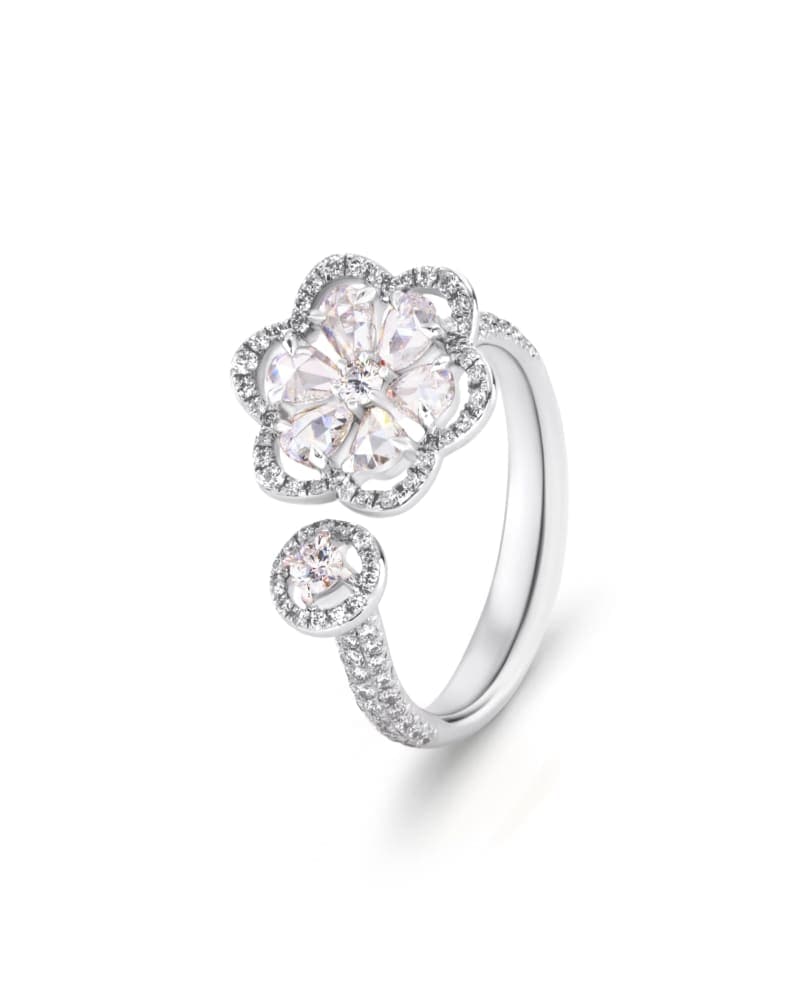
Jewelry photography is widely considered the most technically challenging discipline in commercial eCommerce. Rings, watches, necklaces, and earrings combine polished reflective metals with transparent, multi-faceted gemstones. Under studio strobe lighting, metallic surfaces reflect every camera stand, light box, and ceiling tile in the room, while gemstones pick up distracting glare that obscures clarity and fire.
However, inexperienced retouchers often destroy the visual prestige of fine jewelry by over-editing: airbrushing away natural metal highlights until gold looks like matte yellow plastic, or replacing gemstone facets with cartoonish digital gradients.
Here is the professional retouching protocol for cleaning up metal reflections, enhancing gemstone fire, and producing luxury-grade jewelry visuals that drive sales.
The 4 Challenges of Commercial Jewelry Post-Production
[RAW JEWELRY SHOT]
  ├── Challenge 1: Stray Studio Reflections on Curved Metal Surfaces
  ├── Challenge 2: Blown-Out Specular Highlights (Loss of Precious Metal Texture)
  ├── Challenge 3: Lack of Depth of Field (Blurry Back Prongs & Gemstones)
  └── Challenge 4: Microscopic Dust, Scratches & Casting Pits Under Macro Zoom
Step 1: Multi-Layer Focus Stacking
Because macro lenses have an extremely shallow depth of field, capturing an entire diamond ring in focus across a single exposure is optically impossible.
- Capture Alignment: Photograph 8 to 20 bracketed focus slices on-set using a motorized macro rail.
- Composite Blending: In Photoshop, align layers and execute
Edit > Auto-Blend LayerswithStack Imagesenabled. - Manual Edge Touchup: Inspect the composite prongs and girdle facets at 200% zoom. Automated stacking algorithms often leave soft ghostly fringes around metal prongs that require manual layer mask painting.
Transform flat jewelry photography into luxury e-commerce showstoppers.
From glare-free metal sculpting to diamond facet brilliance, explore our jewelry retouching services with vector clipping path cutouts. Send 3 jewelry pieces for free sparkle and metal cleanup.
Clipping Path on your own images
Hand-drawn vector paths.
Step 2: Metal Reflection Cleanup & Gradient Sculpting
Polished platinum, white gold, and yellow gold require clean, sculptural reflections rather than flat, solid color fills:
- Isolate Metal Surfaces with Pen Tool: Draw individual vector paths separating the shank, prongs, and bezel.
- Remove Distracting Reflections: Use the Healing Brush and Clone Stamp set to
LightenorDarkenmode to remove camera reflections and photographer silhouettes while preserving the natural metal horizon line. - Specular Highlight Preservation: Never erase bright specular reflections. Pure white specular pings (RGB 255) communicate metallic sheen and hard polished surfaces. Soften the transition between the specular highlight and mid-tones using subtle brushed curves.
Step 3: Gemstone Facet Clarity & Contrast Enhancement
Gemstones should display brilliant optical depth, crisp geometric facet borders, and internal light refraction:
- Micro-Masking Facets: Separate the central gemstone from the surrounding metal setting using a detailed vector mask.
- Selective Tone Mapping: Create a targeted Curves adjustment layer. Deepen the internal reflection shadows by 10% to 15% while lifting highlight facet planes. This contrast expansion brings out the diamond's natural "scintillation".
- Neutralizing Color Casts in Diamonds: Diamonds frequently absorb reflections from surrounding yellow gold settings. Use a selective Desaturate adjustment layer on non-colored diamonds, neutralizing yellow or green color contamination while keeping natural chromatic fire (rainbow spectral dispersion) intact.
Step 4: Micro-Dust & Casting Pit Removal
Under 300% zoom, a microscopic speck of dust appears as a glaring flaw on a product page.
- Use Photoshop's Spot Healing Brush set to
Proximity Matchat 100% view to remove surface dust specks and casting imperfections. - Avoid broad Surface Blur or Frequency Separation filters across metal bands. These filters smudge crisp edge corners and create an artificial CGI appearance.
About this guide
Written by the Reframe Visuals editors. Last reviewed October 4, 2026. See how we check our work.
Questions answered
3 questions
When a retoucher uses the Brush Tool or heavy Gaussian blur to paint over metal reflections, they eliminate the subtle micro-texture and hard horizon reflections that define genuine polished metal. Retouching must sculpt existing reflections rather than replace them with flat color.
Focus stacking is a technique where multiple photos of the same object are taken at incrementally different focus distances, then digitally blended together in post-production to produce one tack-sharp image with edge-to-edge depth of field.
Never globally desaturate a diamond. True diamonds display light dispersion (flashes of spectral rainbow colors). Isolate and remove only ambient studio light contamination while preserving the natural red, blue, and yellow chromatic fire flares across facet edges. Want this done on your own pieces? See our jewelry retouching service.
No matching questions
Try a shorter keyword, or choose another category.