The Hollow Body Illusion: A Technical Deep-Dive into Ghost Mannequin & Neck Joint Compositing
The ghost mannequin effect gives garments natural wearable volume. Master the neck joint compositing technique that creates clean apparel listings.
ServicesPublished February 20, 20269 min readBy the Reframe Visuals editors
The Invisible Model
The ghost mannequin (also called "hollow man" or "invisible mannequin") effect is one of the most requested-and most technically demanding-services in eCommerce product photography. The goal: make a garment appear three-dimensional as if worn by an invisible body, revealing both the exterior silhouette and interior construction simultaneously.
Preparing an apparel catalog or seasonal collection drop?
Give your garments realistic 3D hollow-body volume, smooth collar symmetry, and pressed fabric without the model expense. Submit 3 test garments for free sample editing with 12h–72h turnaround.
This effect is mandatory for Amazon apparel listings and expected by customers on virtually every fashion eCommerce platform. It answers the customer's critical question: "What will this look like on a body?" without the cost of model photography.
The Capture Protocol
The ghost mannequin effect requires minimum two shots per garment, often three or more:
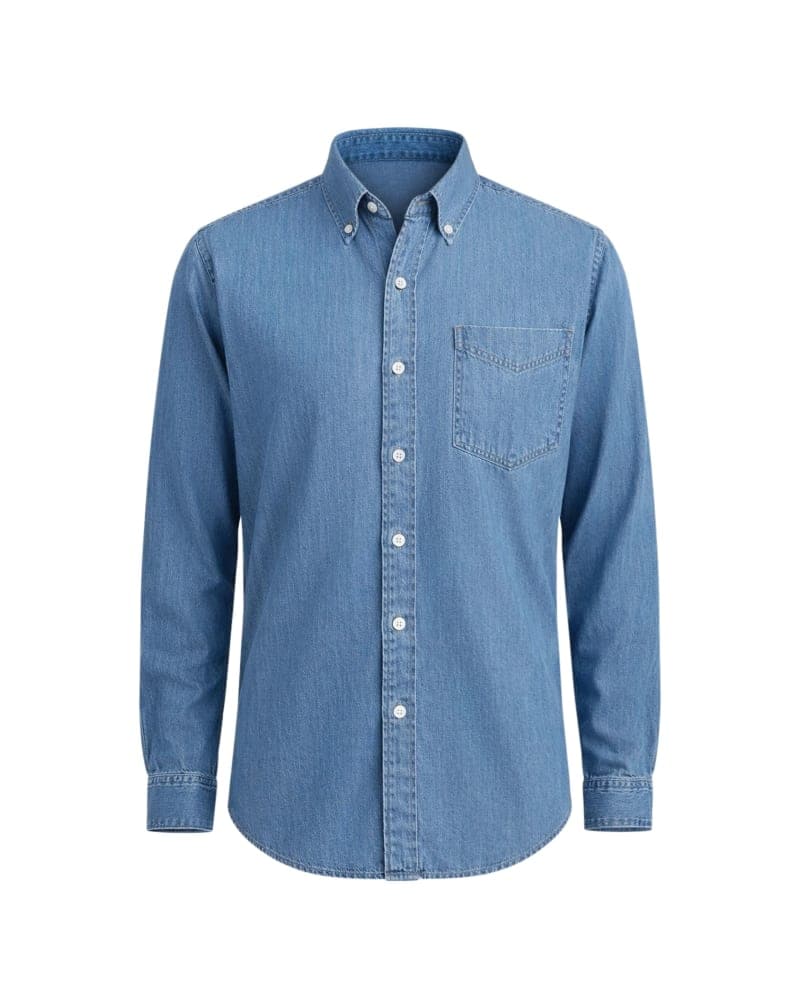
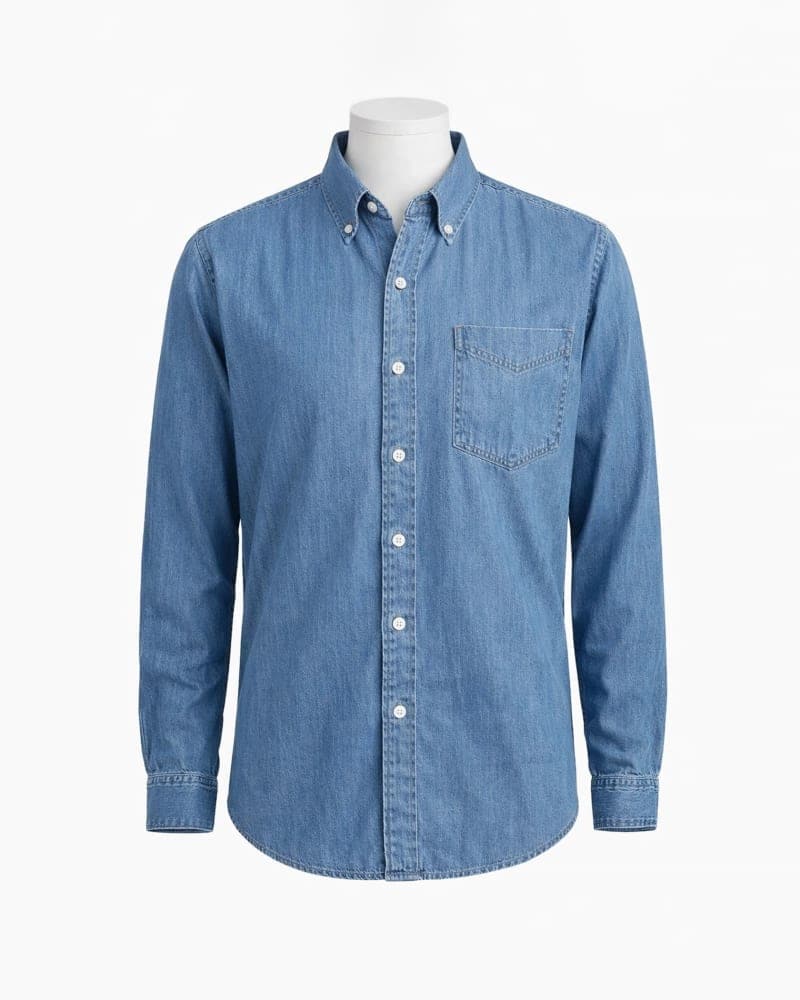
Shot 1: The Exterior The garment is placed on a physical mannequin, styled to show the full front silhouette. The mannequin should match the garment's intended fit (slim, regular, relaxed). Pins and clips are used on the back to create a clean, form-fitting front view.
Shot 2: The Interior (Neck Joint) The garment is removed from the mannequin and laid flat or placed on a foam form with the collar/neckline folded back to reveal the interior neck area, label, and inner construction. This shot provides the "inside" that will fill the gap left when the mannequin is removed.
Shot 3 (Optional): The Back For garments with significant back details (zippers, designs, back pockets), a third shot is taken from behind with the garment reversed on the mannequin.
The Compositing Workflow
After capture, the magic happens in post-production through our Ghost Mannequin editing pipeline:
Step 1: Mannequin Extraction Using precision Clipping Path technique, the editor creates a path around the garment's exterior, carefully excluding the mannequin's neck, arms, and bottom edge. This is the most critical step-any error here will be visible in the final result.
Step 2: Interior Placement The neck joint image is extracted and positioned inside the collar opening of the exterior shot. The editor must match:
- The perspective and scale of both images
- The fabric grain direction at the composite boundary
- The shadow behavior where interior meets exterior
- The color temperature between the two shots
Step 3: Seam Blending The boundary between exterior and interior images must be invisible. This requires:
- Pixel-level feathering at the composite edge
- Texture cloning to disguise any misalignment
- Shadow painting to create realistic depth inside the collar
Step 4: Shape Refinement After compositing, the garment's silhouette is refined. Minor Liquify adjustments correct any asymmetry caused by imperfect mannequin styling. The shoulder points must be perfectly level. The hem must be perfectly straight (unless it's a designed asymmetric hem).
| Step | Time Required | Difficulty | Tools Used |
|---|---|---|---|
| Mannequin Extraction | 10-20 min | High | Pen Tool, Layer Masks |
| Interior Placement | 5-10 min | Medium | Transform, Warp |
| Seam Blending | 10-15 min | High | Clone, Heal, Gradient |
| Shape Refinement | 5-10 min | Medium | Liquify, Transform |
| BG + Shadow | 3-5 min | Low | Background fill, Shadow |
The 7 Common Mistakes
After processing thousands of ghost mannequin projects, these are the errors we see most often from inexperienced studios:
- The Floating Collar: The neck joint doesn't connect convincingly to the collar, creating a "hovering" neckline.
- The Flat Chest: Insufficient depth in the chest area makes the garment look 2D instead of 3D.
- Asymmetric Shoulders: One shoulder higher than the other-usually caused by uneven mannequin styling.
- Color Mismatch: The interior shot was taken under different lighting than the exterior, creating a visible color shift at the composite boundary.
- Missing Interior Shadow: The inside of the collar should show subtle shadow depth. Without it, the illusion breaks.
- Pin Marks: Styling clips leave visible indentations in the fabric that weren't retouched out.
- Wrong Mannequin Size: Using a size M mannequin for a size XL garment creates an unrealistic silhouette that misrepresents the fit.
Beyond the Basic Ghost
Advanced Ghost Mannequin techniques include:
Sleeve Shaping: For short-sleeve and sleeveless garments, the arm openings must be shaped to suggest the absent arm without collapsing flat.
Bottom Hem Styling: The bottom edge of shirts, dresses, and jackets should maintain a natural curve-not a rigid straight line.
Multi-Layer Compositing: Garments with complex structures (layered jackets, cardigans over shirts) may require 4-5 separate shots composited together.
360-Degree Ghost: Some brands require ghost mannequin views from multiple angles (front, 3/4, side, back), all maintaining consistent proportions and shadow behavior.
The Business Case
For brands with 100+ apparel SKUs, ghost mannequin photography offers a compelling cost advantage over model photography:
- Model shoot: $50-150 per SKU (model fees, styling, studio time)
- Ghost mannequin: $15-40 per SKU (mannequin capture + professional compositing)
At scale, this represents a 60-75% cost reduction while producing images that are often more informative than model shots. The customer sees the garment's true shape, not how it looks on one specific body type.
- Capture: Minimum 2 shots (exterior + neck joint). More for complex garments.
- Composite: Precision blending where interior meets exterior.
- Refine: Silhouette, symmetry, and shadow perfection.
The invisible mannequin is only invisible when the technique is perfect. Any flaw breaks the illusion.
Get an exact price for your images.
Tell us your volume and the edits you need. We reply with a price, and you can send sample images to make it exact.